Cycle Tracking
Cycle tracking shows your menstrual cycle day on your calendar, so you can schedule high intensity sessions when you expect to feel strong and recovery or technique work when energy may be lower.
Enabling Cycle Tracking
Open Daily Metrics settings
Go to Metrics → Daily Metrics.
Enable the feature
Click Track Menstrual Cycle below your other metrics.
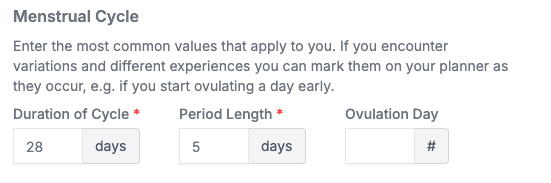
Once it’s enabled, you can edit the start date of your cycle by clicking Edit.
Mark Day 1
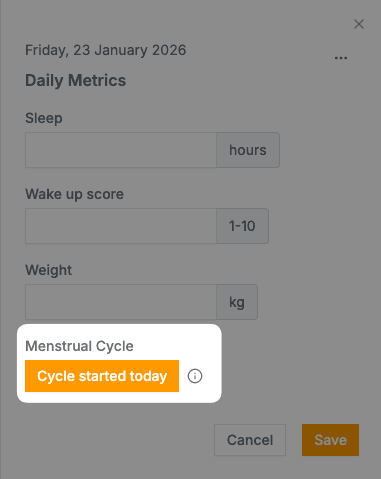
Go to your dashboard and find the day your most recent cycle started. Open the Daily Metrics panel and click Cycle started today.
Reading the Calendar
Your schedule shows a badge next to each day with your cycle day number. Hover over the number to see it as “Week X, Day Y” instead.
Planning Around Your Cycle
The table below is a general guide. Track your own patterns to learn what works for your body.
| Phase | Training Focus |
|---|---|
| Days 1-5 | Recovery, technique, low intensity |
| Days 6-14 | Build intensity, strength work |
| Days 15-21 | Peak performance, hard sessions |
| Days 22-28 | Maintain, listen to your body |
Starting a New Cycle
When your next cycle begins, find Day 1 on your calendar, open Daily Metrics, and click Cycle started today. The schedule recalculates automatically, however long your previous cycle was.
Related
- Daily metrics — Track other health variables
- Rest days — Schedule recovery
- Training plans — Structure your training